You didn’t write the vulnerable code. You didn’t pick a sketchy package from a dark corner of the registry. You ran npm install on a dependency you’ve used for years, trusted by millions, authored by someone with a solid reputation — and somewhere three or four hops down the dependency tree, a maintainer whose name you’ve never heard got phished, and now a cryptominer is running on your machine.
This is the uncomfortable shape of supply-chain attacks: you don’t have to be targeted. You just have to install something that depends on something that depends on something that got compromised. The attack doesn’t need to find you. It’s already inside the thing you trust.
For a homelab running Node.js services, this isn’t a corporate threat-model problem. It’s a you problem. Your machine has npm tokens, environment files, cloud credentials, maybe SSH keys sitting in ~/.ssh. You run things as your own user. If a postinstall script gets code execution on your box, it has what it needs. The attack surface is the whole machine, not just the package.
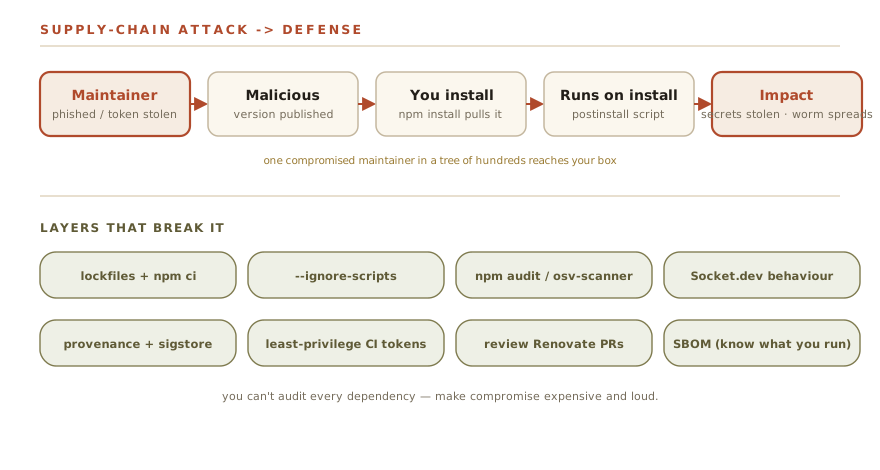
How These Attacks Actually Work
Before the case files, it’s worth having a clear taxonomy. These attacks aren’t all the same. The delivery mechanism matters, because it determines which defenses actually help.
| Attack pattern | How it gets in | Real example |
|---|---|---|
| Maintainer account takeover | Attacker phishes or credential-stuffs an npm account, publishes malicious version | ua-parser-js (2021), chalk/debug/qix (2025) |
| Malicious maintainer handoff | Original author transfers package ownership to attacker posing as a contributor | event-stream (2018) |
| Hostile maintainer | Legitimate, trusted maintainer deliberately introduces a destructive payload | node-ipc (2022) |
| Typosquatting | Attacker registers a package with a name close to a popular one, waits for typos | Ongoing, hundreds of examples |
| Dependency confusion | Attacker publishes a package on public npm that shares a name with your private internal package | Reported widely since 2021 |
| Malicious lifecycle scripts | Any of the above use postinstall, preinstall, or install hooks to get code execution at install time |
Used in ua-parser-js, Shai-Hulud |
The last row is what makes npm attacks particularly effective: installing a package isn’t a passive act. npm runs scripts. By default, any package in your tree can execute arbitrary code the moment you run npm install. You gave it permission when you hit Enter.
The Case Files
event-stream — 2018 — The Maintainer Handoff
The original, and still the most elegantly patient attack in npm history.
The event-stream package was a widely-used Node.js streaming utility with tens of millions of downloads. Its original author, Dominic Tarr, had largely moved on from maintaining it. In September 2018 he transferred ownership to a new contributor called right9ctrl, who seemed interested in helping out.
Two months later, right9ctrl released version 3.3.6. It added a new dependency: flatmap-stream. Buried inside flatmap-stream was an AES-256 encrypted payload that only executed if a very specific condition was met — the npm_package_description environment variable had to equal the string "A Secure Bitcoin Wallet". That’s the description field of a specific application: Copay, a Bitcoin wallet used by large holders.
The attack was inert for everyone except Copay users running versions 5.0.2 through 5.1.0. For them, it silently exfiltrated wallet credentials and private keys to a server in Kuala Lumpur. It sat undetected for about two months and amassed roughly 8 million downloads before a developer noticed the suspicious dependency.
The lesson: Targeted attacks can hide in plain sight. Your packages don’t have to target you specifically for you to be collateral damage. And “passing the maintenance baton” is a known attack surface — right9ctrl had literally asked for maintainer access.
ua-parser-js — October 2021 — Account Takeover
ua-parser-js detects browser, OS, and device type from User-Agent strings. Nearly 8 million weekly downloads. Used in production at Facebook, Microsoft, Amazon, Slack, Discord, and a few hundred other organizations you’ve heard of.
On October 22, 2021, someone compromised the maintainer’s npm account and published three malicious versions: 0.7.29, 0.8.0, and 1.0.0. Each shipped an install-time script (a preinstall hook) that, depending on the operating system, either downloaded an XMRig Monero cryptominer (Linux) or deployed a Windows cryptominer plus an infostealer that harvested credentials from the machine — then sent the haul home.
The malicious versions were live for roughly four hours. Clean versions (0.7.30, 0.8.1, 1.0.1) were published shortly after. Four hours was enough.
The lesson: Account takeover can happen to careful, legitimate maintainers. You have no visibility into the security posture of every account in your dependency tree. A lockfile pins the version but doesn’t protect you if the attack already exists in the pinned version — which is exactly why keeping lockfiles committed and auditing them matters.
node-ipc — March 2022 — Hostile Maintainer
This one is different, and in some ways more disturbing, because the attack came from the legitimate maintainer acting deliberately.
Brandon Nozaki Miller, who maintained the popular node-ipc inter-process communication package, pushed malicious code in node-ipc versions 10.1.1 and 10.1.2. The payload checked whether the machine’s IP geolocated to Russia or Belarus. If so, it recursively overwrote files with a heart emoji — effectively destroying data on those machines as a protest against the Russian invasion of Ukraine. (A separate, milder module the same author added around the same time, peacenotwar, merely dropped a protest text file; the destructive overwrite was node-ipc’s own code.)
Vue CLI, one of the most widely used JavaScript scaffolding tools, depended on node-ipc. The protestware shipped to users who ran Vue CLI setup scripts during that window.
The technical mechanism — a trusted maintainer pushing a destructive payload — is identical to a supply-chain attack. That the motivation was political rather than financial changes nothing from a systems security perspective. Code you didn’t write and can’t audit executed on your machine and destroyed data.
CVE-2022-23812 was assigned. The malicious versions were pulled.
The lesson: Behavioral auditing of packages matters, not just version pinning. A package that was safe last week can become dangerous this week because of a human decision, not a hack. This is the argument for tools that flag behavioral changes in packages — new network calls, new file operations, new lifecycle scripts — between versions.
September 2025 — The qix Compromise (chalk, debug, and 16 others)
On September 8, 2025, malicious versions of 18 npm packages started appearing on the registry. The packages included chalk (around 300 million weekly downloads), debug (even higher), color-convert, color-name, ansi-styles, strip-ansi, and a dozen others — collectively over two billion weekly downloads.
The attack vector was a phishing campaign targeting npm maintainers. The domain npmjs.help was used to harvest credentials through a convincing fake “two-factor authentication update” email. The account compromised belonged to qix, a prolific maintainer who controlled a substantial slice of the color and terminal utility ecosystem — packages that show up in virtually every Node.js project’s transitive dependencies.
The malicious payload hooked into fetch, XMLHttpRequest, and browser wallet APIs (window.ethereum, Solana endpoints) to intercept and reroute cryptocurrency transactions to attacker-controlled addresses. A classic browser crypto-clipper — but delivered via packages that run in Node.js build pipelines, which also get bundled into browser-facing code.
Aikido Security detected the malicious versions approximately two hours after they appeared. During that two-hour window, the malicious code reached an estimated one in ten cloud environments.
The lesson: Ubiquitous utility packages — the ones every project pulls in — are the highest-value targets precisely because they’re everywhere. A two-hour exposure window on a package with hundreds of millions of weekly downloads is a very bad two hours.
Shai-Hulud — September–November 2025 — The Worm
This is the one that represents a genuine evolution, and if you run a homelab with any npm activity, it’s worth understanding in detail.
Shai-Hulud (named after the sandworm from Dune, because threat researchers have taste) was first detected by ReversingLabs on September 15, 2025, with the initial infection beginning September 14. What made it different from every previous npm attack is what it did after it ran on your machine.
Most supply-chain attacks are one-directional: compromise a package, get code execution on victim machines, exfiltrate credentials. Done.
Shai-Hulud added a second stage: it used the credentials it stole to spread.
The worm’s lifecycle:
- Victim runs
npm installon a poisoned package - Postinstall script runs, downloads and executes TruffleHog — the open-source secret scanner — against the victim’s local filesystem and environment
- TruffleHog finds npm tokens, GitHub tokens, AWS credentials, GCP credentials — whatever is present
- Credentials are exfiltrated to attacker-controlled webhooks
- If a valid npm publish token is found: the worm publishes malicious versions of every other package the victim maintains
- Each newly-infected package repeats from step 1 when anyone installs it
Over 180 packages were compromised in the initial wave. A second variant (“Shai-Hulud 2.0”) arrived in November 2025 with improved evasion techniques and compromised over 500 packages. A further campaign dubbed “Mini Shai-Hulud” surfaced in spring 2026, hitting packages across the TanStack, Mistral AI, and other dependency trees.
The self-replication is what makes this qualitatively different. Previous attacks required the attacker to maintain access to a specific compromised account. Shai-Hulud spread the infection autonomously using its victims as propagation infrastructure.
The lesson for a homelabber: If you maintain any npm packages — even tiny personal ones — your npm publish token sitting in ~/.npmrc is a worm propagation vector. Your machine is a potential node in someone else’s botnet. Least-privilege tokens with minimal scope and short TTLs aren’t paranoia; they’re hygiene.
The uncomfortable math.
Pick any reasonably complex Node.js project. Run npm ls --all and count the unique packages. A typical Express app has 300-500 transitive dependencies. Each dependency is maintained by at least one person. Each of those people has an npm account. Each of those accounts is one convincing phishing email away from being compromised.
You have almost certainly never heard of the majority of maintainers in your dependency tree. You have no insight into whether they use a password manager, whether they have MFA enabled, or whether they’re under financial pressure that might make a malicious handoff attractive.
The September 2025 attack moved from phishing email to malicious version live on npm to “in one in ten cloud environments” in two hours. That is not a timeline that allows for manual human response.
Your transitive dependency graph is a trust surface you did not choose and cannot fully audit. The defenses below are about making compromise expensive and loud, not about making it impossible.
The Defense Stack
These aren’t in alphabetical order. They’re in rough priority order for a homelab that runs Node.js services. Do the cheap ones first.
1. Commit your lockfile. Always use npm ci.
If you take nothing else from this post, take this.
npm install resolves versions at install time and can silently pull in newer versions of packages. npm ci installs exactly what is in your lockfile and fails if there’s a mismatch. It is strictly safer for anything that isn’t an initial dependency resolution.
# In any CI/CD pipeline or automated deploy:
npm ci

# Not this:
npm install
Your package-lock.json (or yarn.lock, or pnpm-lock.yaml) must be committed to your repository. A lockfile that isn’t committed isn’t protecting anything. It only pins versions if it’s there.
This doesn’t prevent an attack that’s already in the version you’ve locked to — but it prevents you from silently pulling in a compromised newer version because someone ran npm install and auto-updated.
2. Disable lifecycle scripts for CI installs
npm runs preinstall, install, and postinstall scripts by default. These are how most supply-chain attacks get code execution. You can disable them:
# One-time config:
npm config set ignore-scripts true

# Or per-command:
npm ci --ignore-scripts
The cost: some legitimate packages use postinstall scripts for binary compilation (native addons, things like esbuild, sharp, node-sass). With scripts disabled, those packages won’t work until you run their scripts manually. This is annoying; it is also a meaningful security improvement. You can selectively re-enable for specific packages:
# After confirming the package is legit:
npm rebuild esbuild
For a homelab CI pipeline that just runs your services, the odds are good that --ignore-scripts works without any extra steps. Try it.
3. Run npm audit — but understand its limits
npm audit
npm audit --audit-level=high
npm audit checks your dependency tree against the npm advisory database for known vulnerabilities. It’s free, it’s built in, and you should be running it. The limit is that it only catches what’s been reported. Shai-Hulud packages were live for days or weeks before they were in any advisory database.
For broader coverage, Google’s OSV-Scanner checks against multiple vulnerability databases simultaneously:
# Install (it's a Go binary — Homebrew, Go, or a release binary):
brew install osv-scanner
# or: go install github.com/google/osv-scanner/v2/cmd/osv-scanner@latest

# Scan a project directory (or point at a lockfile):
osv-scanner scan source .
osv-scanner --lockfile package-lock.json
Run both in your pipeline.
4. Use Socket.dev for behavioral analysis
Socket.dev is the most useful tool in this space that most people haven’t heard of. Where npm audit checks against known CVEs, Socket analyzes package behavior — does this new version make network calls it didn’t make before? Does it access the filesystem in new ways? Does it have a new postinstall script?
This is exactly the kind of signal that would have flagged event-stream and ua-parser-js earlier. The free tier covers open-source projects; there’s a GitHub integration and a CLI:
npx socket scan .For a homelab context: I run this before pulling in any new dependency, not as part of automated CI. The noise-to-signal ratio is better when it’s a human check on a specific decision rather than a gate that blocks every install.
5. Pin critical dependencies and review diffs before updating
Dependabot and Renovate will auto-create PRs when your dependencies have updates. This is good. Auto-merging those PRs without review is not.
# .github/dependabot.yml — reasonable config
version: 2
updates:
  - package-ecosystem: "npm"
    directory: "/"
    schedule:
      interval: "weekly"
    # Don't auto-merge major version bumps
    open-pull-requests-limit: 10
When a PR comes in from Dependabot: look at the diff. Specifically look at whether the update changes any lifecycle scripts, adds new dependencies, or modifies network behavior. For patch updates on packages you’ve used for years this can be a 30-second check. For major version bumps it deserves more time.
The alternative is a fully automated pipeline where a compromised version update merges itself and deploys to your services. Don’t build that pipeline.
6. Generate and check npm provenance
As of npm 9.x, packages can be published with sigstore-backed provenance attestations that link a published version to a specific Git commit in a specific repository, via a verifiable build chain. When provenance is available:
# Verify registry signatures and provenance attestations for your installed tree:
npm audit signatures

# Or check a single package on the npm website — look for the "provenance" badge
Not every package has provenance yet — it requires the publisher to opt in. But for critical packages in your stack, it’s worth checking. A package with attestable provenance is meaningfully harder to backdoor than one without. This is early-stage infrastructure but it’s moving fast.
7. Use short-lived, scoped npm tokens
If you publish packages or if your CI/CD pipeline needs to read private packages:
# Create a scoped token (requires npm account; granular tokens are also available in the npm web UI):
npm token create --read-only        # for installs only
npm token create --cidr=10.0.0.0/8  # restrict token use to an IP range
Tokens with publish scope should have short TTLs and be rotated regularly. If Shai-Hulud runs on your machine and finds an npm token, the scope of that token determines how much damage it can do. A read-only token can’t publish. A publish token with a 24-hour TTL buys you a detection window.
Store tokens in your secrets manager, not in .npmrc files committed to source control or left in plaintext in environment variables. (If you’re using a homelab secrets manager — Vaultwarden, HashiCorp Vault, whatever — npm tokens belong there.)
8. SBOM generation
Software Bill of Materials — a machine-readable inventory of every component in your build — is increasingly a compliance requirement for serious projects and useful for homelabs that care about what they’re actually running:
# Generate an SBOM in CycloneDX format:
npx @cyclonedx/cyclonedx-npm --output-file sbom.json

# Or in SPDX format:
npx spdx-sbom-generator
This is more useful for auditing what you have than for real-time attack prevention — but it gives you a baseline. When an incident occurs, you can answer “did we depend on that package?” in seconds rather than hours. I’ll cover SBOMs in more depth in a future post.
Cross-reference
If you’re thinking about detection for supply-chain attacks — catching malicious network calls after the fact, spotting TruffleHog running where it shouldn’t — that’s covered in the detection engineering post: /writing/detection-engineering-detections-as-code/. And if you want to understand how threat intelligence fits into knowing which packages to watch before they show up in advisories, that’s /writing/threat-intelligence-that-isnt-just-a-feed/.
The Takeaway
The honest version of this:
Commit lockfiles and use npm ci. This is free and takes ten minutes to set up. It doesn’t prevent attacks in your pinned version but it stops you from silently drifting into a compromised one.
Run scripts off by default in CI. The attack surface for supply-chain attacks in npm is the postinstall hook. Take it away where you can.
Review dependency updates before they merge. Not every update, not every line — but someone with eyes should look at what changed before a new version hits your running services. Automated merging of a compromised update is how a two-hour window of malicious package availability becomes a persistent compromise.
Treat your npm tokens like passwords. Scoped, short-lived, in a secrets manager. If Shai-Hulud finds a read-only install token, it can steal it. If it’s also a publish token, it becomes a propagation vector.
You can’t audit every dependency in your tree. The maintainer graph is too large and too distributed for that to be realistic. What you can do is make compromise harder to silently land (lockfiles, scripts off), make it more likely you notice when something changes (Socket.dev, diff reviews), and limit what an attacker gets if they do reach your machine (scoped tokens, secrets hygiene).
Supply-chain attacks are loud at the ecosystem level and silent at the individual machine level. The defenses above are about flipping that ratio: making them louder where you can actually see them.
This post is part of the Dispatches track — topical deep-dives outside the main “Start Your AI Homelab” series.